Jump to
Arpio generates a PDF report each time you conclude a recovery test, giving you evidence of the test outcome to share with auditors, leadership, or your own customers.
Who can generate reports
Generating a report requires the same role used to run and conclude tests today.
Generating a report
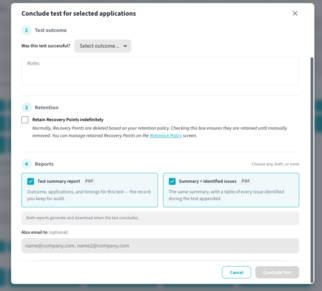
Reports are generated from the Conclude Test modal:
- Tap Conclude Test button from your application.
- Select the application(s) you wish to conclude.
- Under Test Outcome, indicate whether the test was successful and add any notes.
- Select Retention policy
- Under Generate Report, check select a report
- Summary Report
- Summary Report + Issues:
- Add email addresses under Send to for anyone who should receive a copy of the PDF report.
- Select Conclude Test.
Once the test concludes, the report generates and downloads automatically, and it's emailed to anyone listed under Send to.
NOTE: A report is not generated if a test is cancelled before it's concluded.
Regenerating a report
Self-serve historical report generation from the console is planned for a future release. Until then, if you need to regenerate a report, contact your Arpio customer success team and they can regenerate it on your behalf.
Report contents
Overview
-
Test type
-
Test date
-
Initiated/concluded timestamps (in UTC)
-
Initiated and concluded by (will be 'Arpio User' if name is unknown)
-
Restore rate
- Issue summary
- Count of issues detected on initial restore
- Count of open issue at test conclusion
Recovery Point Summary
-
Total number of applications and resources tested
-
Geographic separation: Same Region or Cross Region
-
Per application:
-
Resource count
-
Recovery point used
-
RPO
-
Age of the recovery point at the time of recovery
-
Restore Summary
-
Overall restore rate
-
Total retries (user initiated retried)
-
Arpio system restore time (system measured)
-
Test duration (user bound)
- Time user hit start test until user clicked conclude
Recovery Timeline
The recovery timeline is visual indicator of each application's restore timeline including:
-
Total duration across any stops and restarts
-
Result (Success of Failure)
-
Gaps from a stopped-and-restarted test are shown with a gray bar
Issue Summary
The issues summary is included only in the the detailed report. The issue summary includes the following:
-
Issue summary
-
Resource type (if applicable)
-
Count of occurrences on the initial restore
-
Count of issues open upon concluding the test
- Associated application(s) (if applicable)
Good to know
- If a test is only partially concluded, any cancelled application recoveries are noted as "cancelled" in the report.
- If your RPO is changed between selecting the recovery point and concluding the test, the report shows the latest value.
- Reports are available to all non-standard entitlements. Reach out to your account team if you don't see this option.